Use Uoink from any AI agent.
Connect over MCP, install the Uoink skill, or use the uoink command to search and cite your local library. MCP exposes 91 tools over stdio and 91 in the HTTP registry.
Official MCP registry: io.github.ryanbiddy/uoink. Clients and directories that read the registry can find Uoink.



Stdio and HTTP transports.
Install Uoink before connecting your client. Choose a setup below, then check the testing notes for your agent.
Stdio connects as a local subprocess with all 91 tools. It works without the Uoink helper running. Start Uoink from the Start menu for the dashboard, browser button, and monitored-playlist polling. HTTP exposes the same 91 tools through the running helper.
Use Uoink from any AI agent
Choose MCP, the Uoink skill, or the uoink command. The agent needs access to the computer holding your library. A skill copied to a remote agent does not give it access to local files.
Install Uoink with Add the uoink command to PATH for AI agents checked. Open a new terminal and run uoink status. An agent doing the install can follow the agent installation steps.
1. Connect an MCP client
Claude Desktop uses the .mcpb bundle below. For Claude Code, Cursor, Codex, or VS Code, print a setup recipe:
uoink connect --list
uoink connect claude-code
uoink connect cursor
uoink connect codex
uoink connect vscode
uoink connect --list prints setup choices for 48 clients and integrations, 10 of them new in 3.11.0. 45 recipes are checked against each client's official documentation, and each recipe prints its verification status. Run uoink connect <client> to print config or instructions. The destination and notes go to stderr; config goes to stdout. It does not edit client settings. Run the printed Claude Code command in PowerShell. For other clients, merge the entry into the location shown, then restart the MCP connection.
Cursor's recipe sets UOINK_MCP_TOOLSET=core. In the dashboard, open Settings > Agents (MCP) > Agent connection and choose Add to Cursor or Add to VS Code to open the client's review flow. Client acceptance of these buttons is not yet tested.
Recipes and the client tables in Connect your agent list a Linux location where the client has a Linux setup. Continue is set up by hand from its recipe; the dashboard shows Continue as connected once its entry launches this install.
Uoink's MCP server uses the official MCP Python SDK 2.3.0. Claude Desktop, Claude Code, Cursor, and Codex connect as before, and apps that speak the 2026-07-28 MCP protocol can also connect. No action is needed.
2. Install the Uoink skill
The portable skill teaches Claude Code, Codex, pi, Hermes Agent, and OpenClaw to find evidence, cite sources, and use MCP or the CLI. Run uoink skill path to locate it, or uoink skill install --to <dir> to copy it with its references. The destination is the parent skills directory; Uoink creates a uoink folder inside it. Restart the agent or reload its skills.
# Choose your agent's directory in PowerShell:
# Claude Code
uoink skill install --to "$env:USERPROFILE\.claude\skills"
# Codex
uoink skill install --to "$env:USERPROFILE\.agents\skills"
# pi
uoink skill install --to "$env:USERPROFILE\.pi\agent\skills"
# Hermes Agent
uoink skill install --to "$env:USERPROFILE\.hermes\skills"
# OpenClaw
uoink skill install --to "$env:USERPROFILE\.openclaw\skills"
For a default Uoink install, the Claude Code plugin bundles the skill and MCP connection:
claude plugin marketplace add ryanbiddy/uoink-agent-kit
claude plugin install uoink@uoink
Restart Claude Code and enable the plugin's Uoink MCP server when prompted. For a custom install, use uoink connect claude-code and the standalone skill. Avoid adding the same MCP server through both the plugin and a manual entry.
3. Use the uoink command
Search saved sources, read evidence, capture URLs, save notes, and call registry tools from a local shell:
uoink search "working memory" --limit 5
uoink recent --limit 10
uoink note "A useful thought" --title "Research note"
Local reads work without the helper running. Capture and paid tools keep their existing requirements and consent gates. See Connect your agent for commands and known limits.
Search options
Search matches the useful words in a query; it no longer needs every word. search_library, search_uoinks, and search_clips take optional match and mode parameters, and find_mentions takes match:
match:forgiving(default) orstrict, which requires every word, like Exact words in the dashboard.mode:auto(default),keyword,semantic, orhybrid. Auto uses hybrid when semantic search is ready and keyword search otherwise. Each response says which mode ran.
Semantic search is optional. A person turns it on in Uoink Settings under Semantic search and accepts Google's Gemma terms. Uoink then downloads the EmbeddingGemma model once (about 330 MB) and indexes saved sources on this computer. Until it is ready, use keyword or auto. Quote passage.text only when passage_verified is true; otherwise citation_reason explains why no passage was returned. The tool list is unchanged.
On a Mac
The Mac preview runs on Apple Silicon with macOS 15 or later. The uoink command ships inside the app at Uoink.app/Contents/Helpers/uoink, and the app does not change your shell or PATH. To run it from a terminal, link it into a folder on your PATH:
mkdir -p "$HOME/.local/bin"
ln -s /Applications/Uoink.app/Contents/Helpers/uoink "$HOME/.local/bin/uoink"
export PATH="$HOME/.local/bin:$PATH"
uoink status
Then run uoink connect <client>, for example uoink connect claude-code, uoink connect cursor or uoink connect codex. The recipe uses the app's current location, works with spaces in the path, and does not edit client files. Back up the client's configuration, merge the printed entry and keep unrelated entries: Claude Desktop uses ~/Library/Application Support/Claude/claude_desktop_config.json, Cursor ~/.cursor/mcp.json and Codex ~/.codex/config.toml. Restart the client after editing.
For Claude Desktop's extension flow, open uoink-3.12.0-macos.mcpb and select the installed Uoink.app in its Uoink app setting. The default is /Applications/Uoink.app. Use this Mac bundle, not the Windows .mcpb.
The Claude Code plugin's MCP entry is still for Windows. On a Mac, use uoink connect claude-code and the standalone skill. Library mirroring is unavailable on Mac. The tool inventory matches Windows: 91 tools, or 35 in core mode. On a Mac, Claude Code passed MCP acceptance (3.11.2); other clients are untested there.
What was tested for 3.12.0
Agent Install 30 tested the installed 3.12.0 build in an isolated profile: 21/21 PASS. The Whisper base model came with the install: with an empty Hugging Face cache and downloads blocked, a caption-less X video was transcribed locally, and nothing went to huggingface.co. A music-only X video read Done · no speech found. Stdio listed 91 full / 35 core / 91 modern tools, and Claude Code 2.1.314 (haiku) connected with 91 tools and called get_schema_version. YouTube captures saved English captions, a short X clip got its screenshot, and an in-place upgrade over 3.11.2 kept the library byte-identical. Codex CLI was not re-tested.
What was tested for 3.11.1
Agent Install 27 passed 11/11 checks with the installed 3.11.1 build in an isolated profile:
- Isolated installation;
/healthreported 3.11.1 and migration 32. Stdio listed 91 tools in full mode, 35 in core, and 91 in modern. - Claude Code 2.1.310 (haiku) connected with 91 tools and called
get_schema_version. - Usage sharing stayed off with no network sends observed in that check; the bundled ffprobe passed the audio probe.
- No startup entries were created by the isolated install. The dashboard passed at 1400 and 1100 pixels wide, and uninstall was clean.
- Helper writes persisted across a restart, and
GET /redirected to/dashboard.
Codex CLI was not re-tested in receipt 27. Earlier 3.11.0 testing: Claude Code 2.1.308 over MCP: all 91 tools listed; a tool called. Codex CLI 0.153.4 over MCP: two tools called.
From 3.10.0 testing: Claude Code with the Uoink skill and the uoink command only, with no MCP server, loaded the skill and ran uoink note and uoink recent. The Claude Code plugin loads its skill and starts its MCP server; its tool calls were not run end to end because the test install is isolated from a normal one.
Not yet tested: Gemini CLI and pi (no sign-in on the test machine) and every other recipe in uoink connect. Claude Desktop and Cursor retain their earlier MCP testing status; that does not verify the new recipes.
ChatGPT and claude.ai use copy and paste only. Uoink does not connect to the ChatGPT app over MCP.
HTTP JSON-RPC Transport Details
Endpoint URL: http://localhost:5179/mcp/v1
Authentication: Include the header X-Uoink-Token on every request.
Token Location: Read the token string from the local file %LOCALAPPDATA%\Uoink\token.txt.
One-click Claude Desktop setup
Download and open uoink-3.12.0.mcpb. Claude Desktop installs it as an extension and asks for the Uoink folder. Enter the full path to %LOCALAPPDATA%\Uoink; Desktop does not expand that variable. After updating, reinstall the bundle and restart Desktop.
Claude Code
Run this in PowerShell. It expands the paths to your local install. Verified with Claude Code 2.1.302, including tool listing, saving a note, and reading recent captures.
claude mcp add --scope user --transport stdio uoink -e PYTHONIOENCODING=utf-8 -e PYTHONUTF8=1 -- "$env:LOCALAPPDATA\Uoink\python\python.exe" "$env:LOCALAPPDATA\Uoink\uoink_mcp.py"
Cursor and other stdio clients
Cursor is reported to send only the first 40 tools to its agent. Add UOINK_MCP_TOOLSET=core to the server environment to keep the previous 35-tool set and stay under that cap. The Cursor config below includes it. Omit that setting for the full toolset.
For manual setup, use the README JSON below. Claude Desktop does not expand %LOCALAPPDATA%: replace it in both paths with your full app-data directory, or copy the generated config from the extension’s Settings page. Restart the client after saving.
Cline and Continue are standard-stdio compatibility paths; they were not individually smoke-tested. ChatGPT and claude.ai use copy and paste. Uoink does not connect to the ChatGPT app over MCP.
Cursor config with the core toolset
{
  "mcpServers": {
    "uoink": {
      "command": "%LOCALAPPDATA%\\Uoink\\python\\python.exe",
      "args": [
        "%LOCALAPPDATA%\\Uoink\\uoink_mcp.py"
      ],
      "env": {
        "PYTHONIOENCODING": "utf-8",
        "PYTHONUTF8": "1",
        "UOINK_MCP_TOOLSET": "core"
      }
    }
  }
}
Other stdio clients and manual Claude Desktop config
{
  "mcpServers": {
    "uoink": {
      "command": "%LOCALAPPDATA%\\Uoink\\python\\python.exe",
      "args": [
        "%LOCALAPPDATA%\\Uoink\\uoink_mcp.py"
      ],
      "env": {
        "PYTHONIOENCODING": "utf-8",
        "PYTHONUTF8": "1"
      }
    }
  }
}Ask Cursor to research a launch video from source.
Search my saved videos for the launch announcement and give me timestamped excerpts I can cite.
The agent searches the local library, reads matching items, and retrieves evidence cards with timestamped source links.
search_library({ query: "launch announcement" })
get_library_item({ video_id })
search_clips({ query: "launch announcement" })
get_evidence_card({ video_id })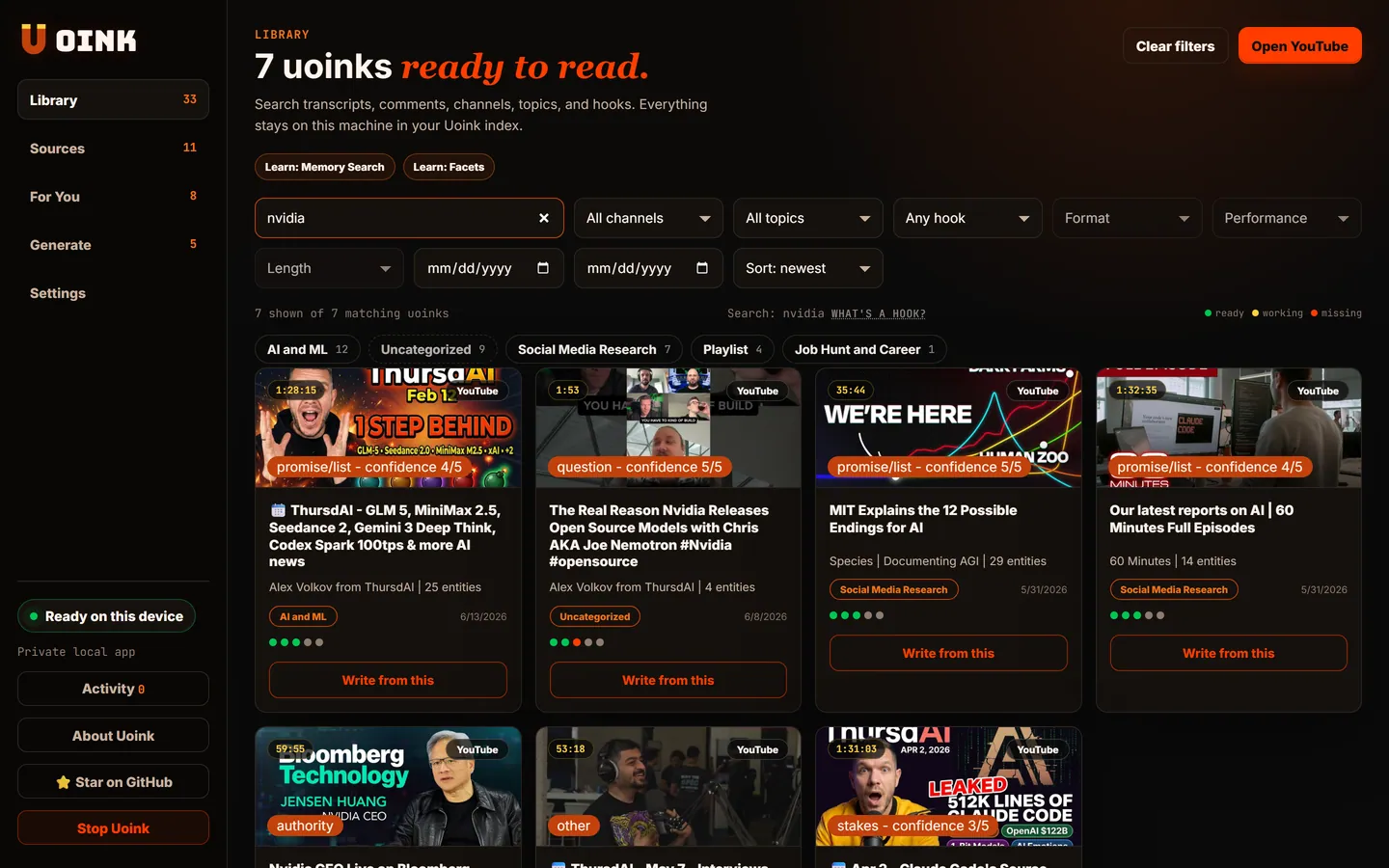
search_uoinks reaches: a local SQLite full-text index over every transcript, comment, and title on disk.Names stay visible. Details stay folded.
HTTP MCP uses the same flattened tool schemas as stdio, so HTTP clients no longer drop Uoink's tools because of their schema shape. The server still checks the exact schema for every call. The manifest includes those exact registry schemas and transport labels.
Start with uoink_video, search_uoinks, get_uoink_corpus, classify_hook, and find_mentions. Open a bucket when you need the rest.
All tools over stdio and HTTPCapture, search, citations, research, writing, scripts, workspaces, sources, and the Library queue. Consent gates are unchanged. The Librarian proposes; applying is off by default and its quality gate has not passed.91 tools
Humans read this page. Agents read the manifest.
- 01
MCP page.
Human-readable server metadata, transport notes, config reminders, and tool list.
Open /mcp -> - 02
Manifest JSON.
Machine-readable tool surface for agent crawlers and registry submissions.
Open JSON -> - 03
llms.txt.
Short product summary, install links, source pages, and agent docs in crawler-friendly text.
Open llms.txt ->