Features / Capture
shippedIn-page Uoink button
Capture YouTube transcripts and frames directly from your browser.
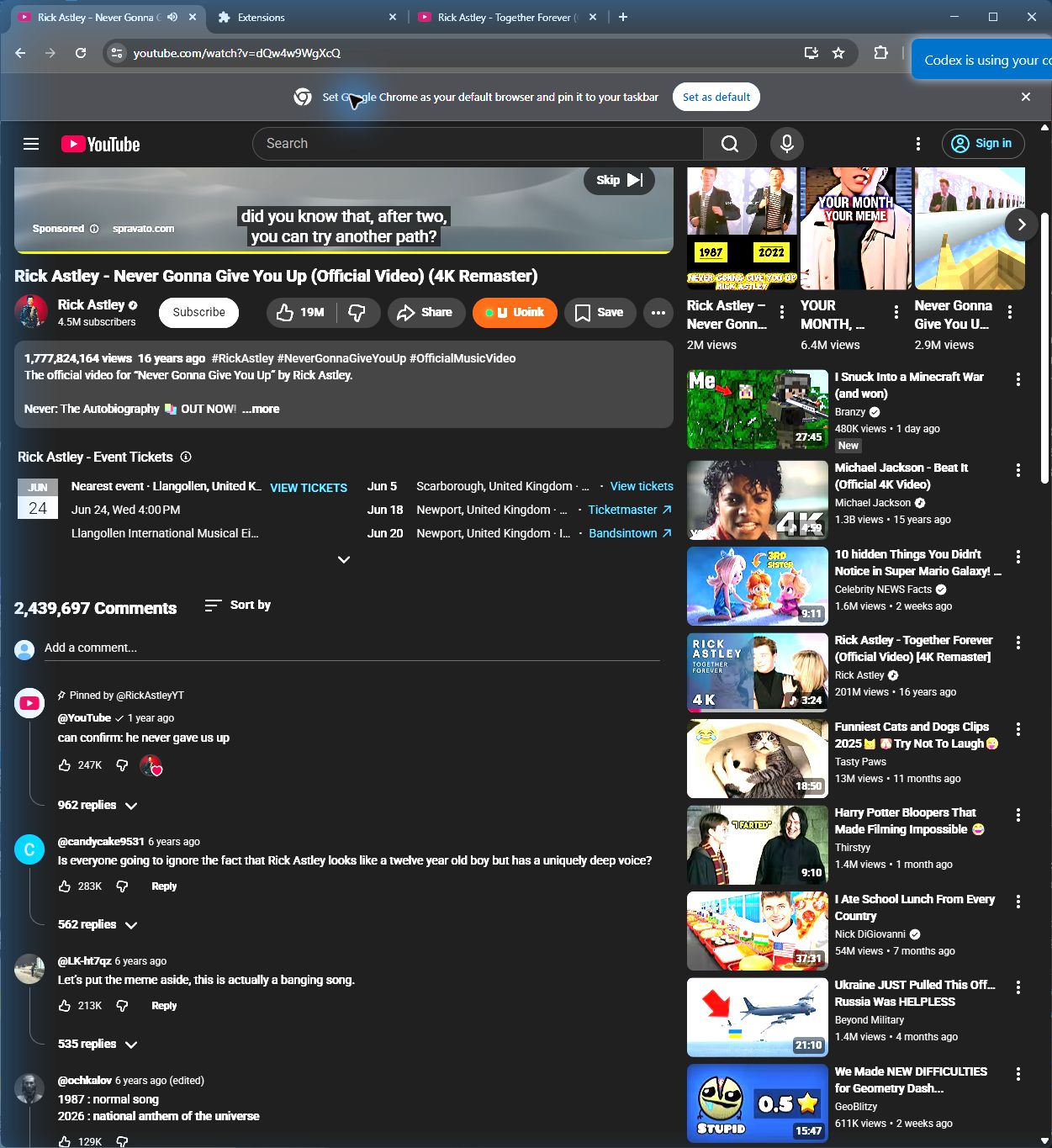
The user-facing part.
The in-page button inserts a rust-colored U directly into the YouTube action row below the video title. When you click it, the extension pings your local helper to start the download. It pulls the transcript, audience comments, and video frames without making you copy URLs or leave the browser tab. The status updates right inside the page.
Run the loop.
- Open a YouTube video page in Chrome or Brave.
- Locate the rust-colored U button next to the Save actions.
- Click the button to start the capture job.
- Wait for the green success checkmark to show in the action row.
- The markdown corpus is now on your clipboard and stored locally.
How Uoink handles it.
The browser extension runs a content script that waits for the video player container to render. It injects a native HTML button styled to match the page theme. Clicking the button posts a payload to the loopback server running on your machine. The helper downloads the audio stream, runs the transcription process, and saves the file directly to your local library without sending your data to external servers.
Agent-readable surface.
uoink_videoget_job_statusFull server metadata lives at /mcp and /mcp/manifest.json.
Run it on your next source.
Install the browser extension and start capturing video content with one click.